
The Comprehensive Guide to Activating Windows 11 Pro Authentically
In the era of digital transformation, Microsoft's Windows 11 Pro operating system has become the optimal choice for professionals and businesses seeking high performance and advanced security. But the question many ask is: How can I activate Windows 11 Pro in an authentic and secure way? In this comprehensive guide, we'll take you on a detailed journey to understand everything you need to know about activating Windows 11 Pro, from basic requirements to practical steps, with a focus on the importance of using genuine keys.
What is Windows 11 Pro and Why Do You Need It?
The Difference Between Windows 11 Home and Pro
Before we begin the activation process, it's important to understand the difference between the two editions of Windows 11. While Windows 11 Home provides basic features suitable for home use, Windows 11 Pro comes with a set of advanced professional features that make it the best choice for professional users and business owners.
Exclusive Features in Windows 11 Pro
1. BitLocker Drive Encryption
One of the most prominent features of Windows 11 Pro is support for BitLocker, which provides a strong security layer to protect your data from theft and hacking. This feature allows you to encrypt the entire hard drive, ensuring your data is protected even if the device is stolen.
2. Hyper-V for Virtual Machines
If you're a software developer or need to run multiple operating systems, Hyper-V allows you to create and manage virtual machines easily. This feature is not available in the Home edition and is essential for professionals.
3. Remote Desktop Connection
This feature allows users to access their computers from anywhere in the world, and is essential for remote work and system management.
4. Mobile Device Management (MDM)
Windows 11 Pro provides advanced tools for managing devices in corporate environments, allowing IT teams to manage all devices from a unified interface.
5. Group Policy Editor
A powerful tool that allows administrators to precisely control system settings and security policies.
Windows 11 Pro System Requirements
Before proceeding with the activation process, you must ensure your device meets the minimum requirements for running Windows 11. Microsoft has set strict standards to ensure a safe and smooth user experience.
Basic Requirements
ComponentRequirementProcessor1 GHz or faster with 2 or more cores on a compatible 64-bit processorRAM4 GB minimumStorage64 GB or moreFirmwareUEFI with Secure Boot supportTPMVersion 2.0 (essential for security)Graphics CardCompatible with DirectX 12 or newer with WDDM 2.0 driverDisplay720p resolution minimum, 9 inches diagonalInternetRequired for initial setup and activation
How to Check Your Device Compatibility
Microsoft provides a free tool called PC Health Check to verify your device's compatibility with Windows 11. You can download the tool from Microsoft's official website and run it to get a comprehensive report on your device's readiness.
Steps:
- Download PC Health Check tool from Microsoft's website
- Install and run the tool
- Click "Check Now" to scan
- Review the results and recommendations
If your device doesn't meet all requirements, you may need to:
- Upgrade RAM to 4 GB or more
- Enable TPM 2.0 from BIOS/UEFI settings
- Enable Secure Boot from firmware settings
- Upgrade storage if less than 64 GB
The Importance of Authentic Windows 11 Pro Activation
Why Should You Use a Genuine Activation Key?
Many users turn to pirated or "cracked" versions of Windows to save money, but this decision may cost you much more in the long run. Let's review the critical reasons that make authentic activation a necessity, not a luxury.
1. Security and Protection from Cyber Threats
Pirated versions of Windows often contain:
- Spyware that steals your personal data
- Ransomware that encrypts your files and demands ransom
- Cryptocurrency mining tools that consume your device resources without your knowledge
- Backdoors that allow hackers to access your device
According to Microsoft research, one-third of pirated version users experienced security breaches, resulting in significant financial and moral losses.
2. Receiving Continuous Security Updates
With genuine activation, you get:
- Monthly security updates that patch new security vulnerabilities
- Feature updates that add new functionalities
- Performance and stability improvements
- Immediate bug fixes
Pirated versions don't receive these updates, leaving your device permanently vulnerable to hacking.
3. Optimal Performance and Stability
Genuine versions ensure:
- No unauthorized modifications to system files
- No random crashes or unexpected restarts
- Full use of device resources without hidden consumption
- Better compatibility with software and applications
4. Legal Compliance and Avoiding Consequences
Using pirated versions is:
- A violation of intellectual property rights
- A software piracy crime that may expose you to financial penalties
- A breach of Microsoft's usage agreements
- A risk to company reputation and customer trust
5. Full Technical Support
With the genuine version, you get:
- Direct technical support from Microsoft
- Quick solutions to technical problems
- Official educational resources and comprehensive documentation
- Lifetime warranty on the activation key
6. Hassle-Free User Experience
Genuine Windows activation removes:
- Annoying "Activate Windows" messages
- Restrictions on customization like changing wallpaper and colors
- Repeated activation notifications
- Restrictions on some advanced features
Steps to Activate Windows 11 Pro Authentically
Now that we understand the importance of genuine activation, let's move to the practical step-by-step guide for activating Windows 11 Pro.
Method One: Activation Through Settings (Recommended Method)
This is the official and safest method to activate Windows 11 Pro.
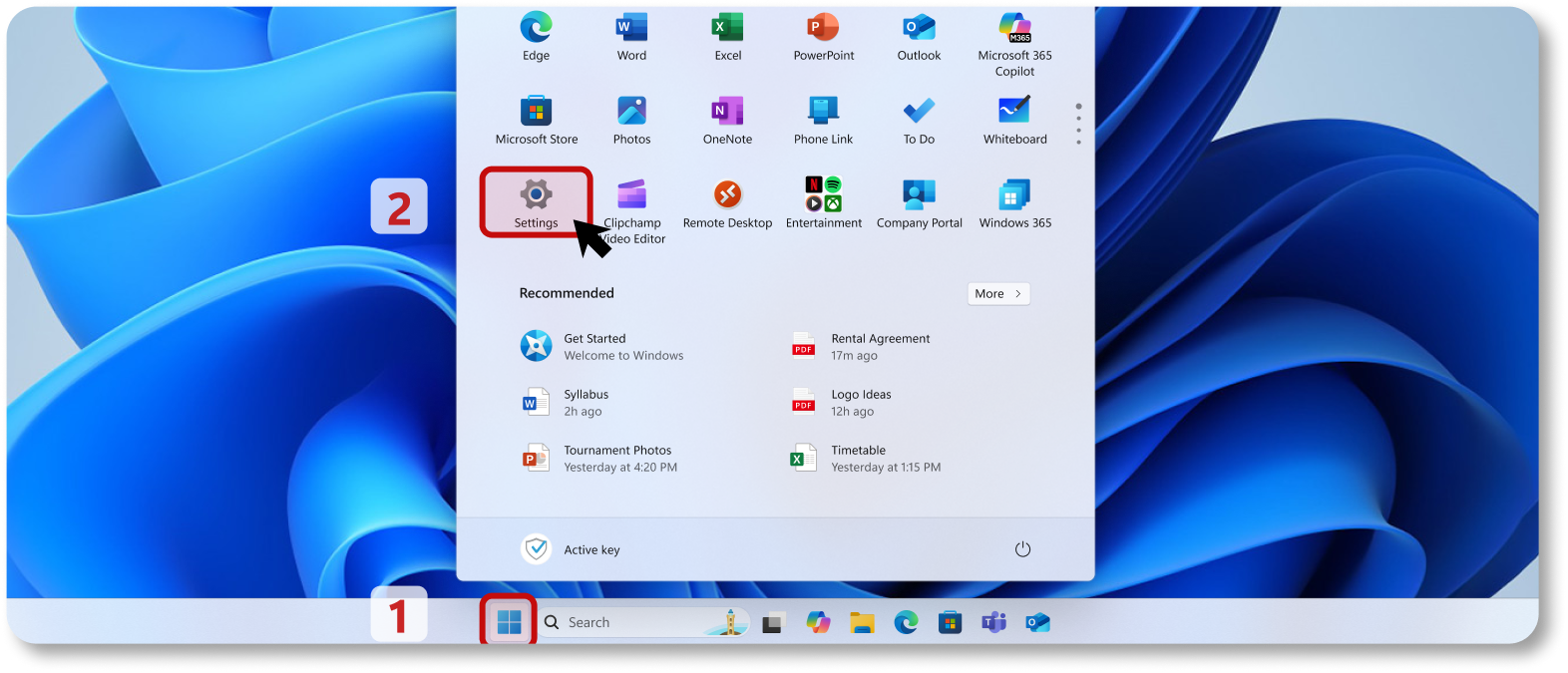
Step 1: Open Settings
- Press the Start button from the taskbar
- Or use keyboard shortcut: Windows + I
- The Settings window will appear
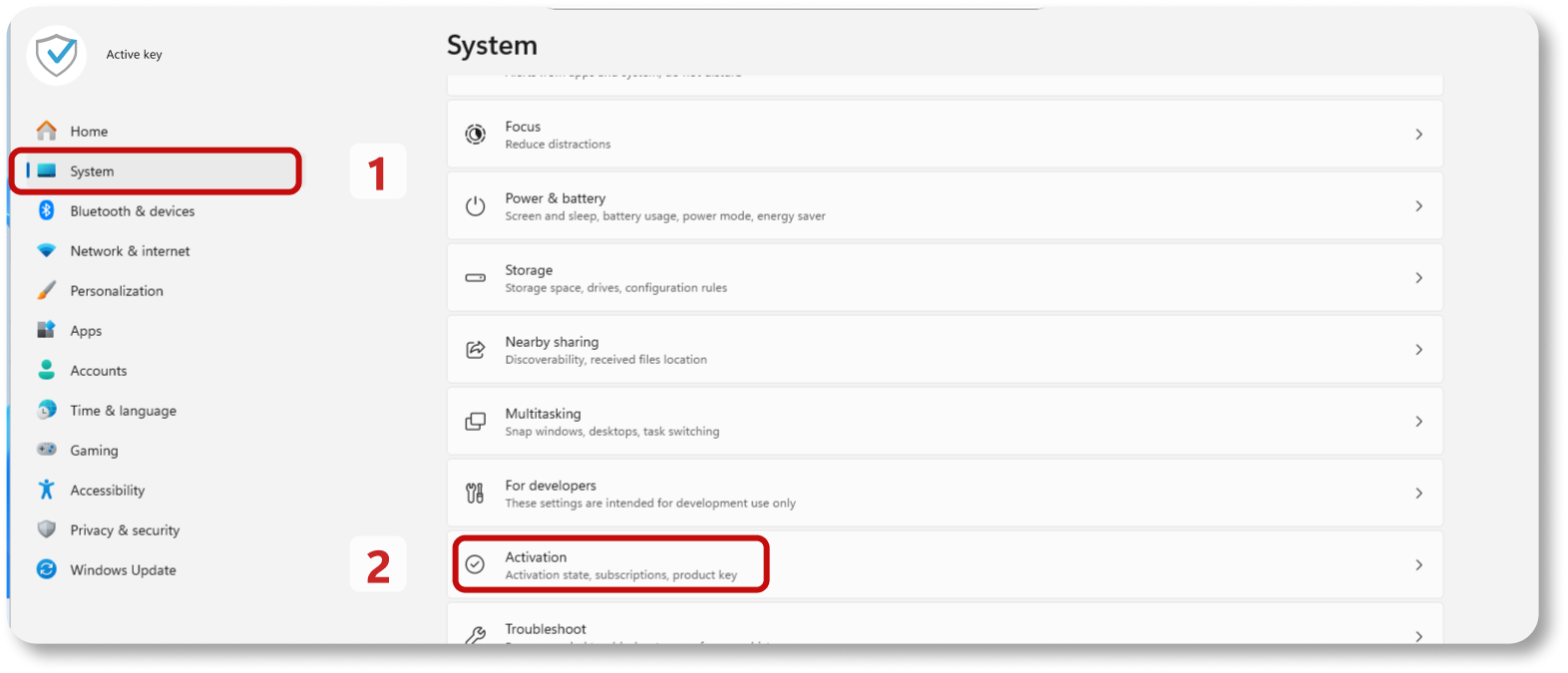
Step 2: Navigate to Activation Section
- From the left menu, choose System
- Then choose Activation
- You'll see information about the current system activation status
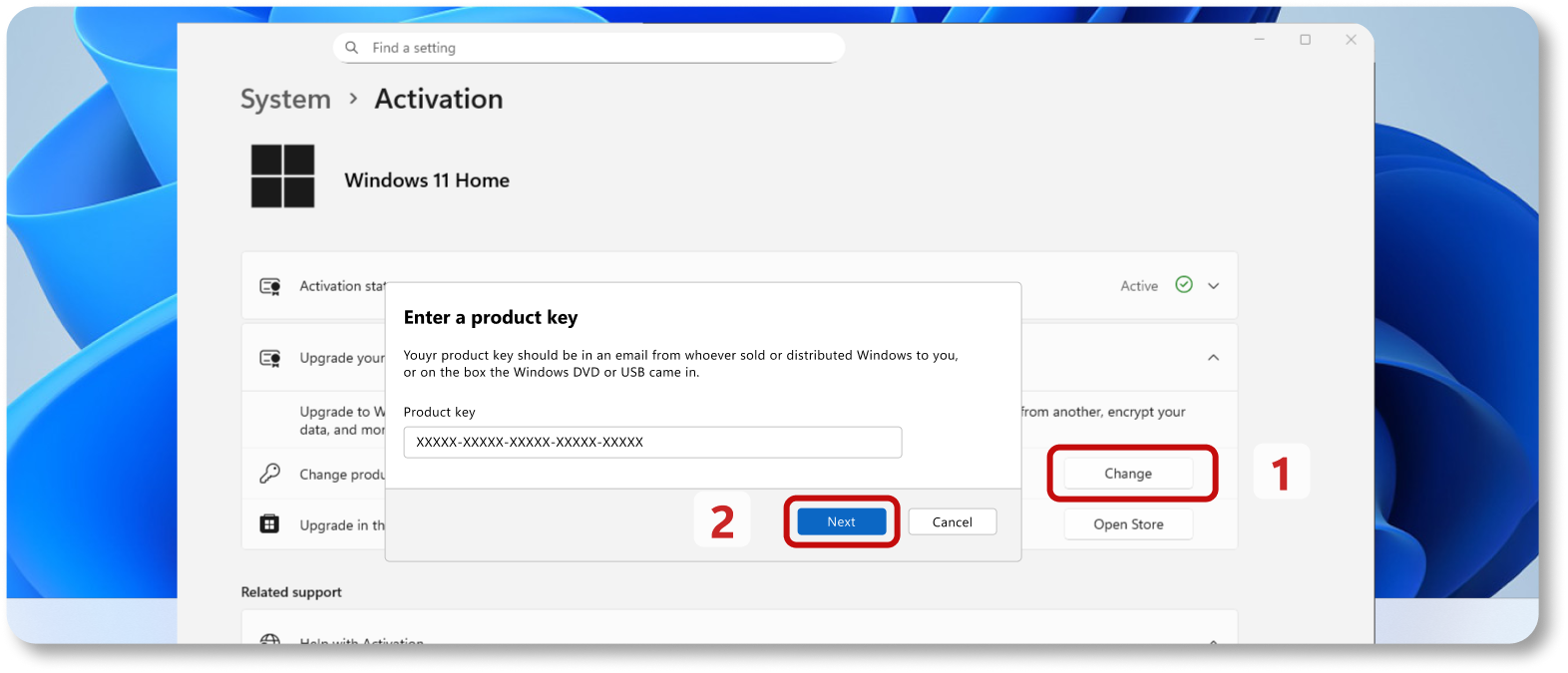
Step 3: Change Product Key
- On the activation page, look for "Change product key" option
- Click this option
Step 4: Enter Activation Key
- A pop-up window will appear to enter the key
- Enter the 25-character product key (format: XXXXX-XXXXX-XXXXX-XXXXX-XXXXX)
- Make sure to enter the key accurately without errors
- Click "Next"
Step 5: Complete the Activation Process
- The system will connect to Microsoft servers to verify the key validity
- The process may take 30 seconds to two minutes
- After successful verification, a message will appear: "Windows is activated"
- You can now close the window and enjoy your activated system
Method Two: Activation via Phone (Without Internet)
If you don't have a stable internet connection, you can use the phone activation method.
Steps:
- Open Run window
- Press Windows + R
- Type the following command
- Type: SLUI 4
- Press Enter
- Choose your country
- A list of countries will appear
- Choose Saudi Arabia or your country
- Call the displayed number
- A toll-free number will appear
- Call the number and follow the voice instructions
- Enter installation ID
- You'll need to enter the installation ID shown on your screen
- May consist of 9 groups of numbers
- Get confirmation code
- After entering the information, you'll get a confirmation code
- Enter the code in the designated place
- Complete activation
- Click "Activate Windows"
- Activation process will complete immediately
Method Three: Link Digital Key to Microsoft Account
This method is useful if you plan to change your device components in the future.
Why Link Key to Microsoft Account?
- Easy reactivation after hardware changes
- Transfer license to new device
- Protection from key loss
Steps:
- Ensure Windows is activated
- Open Settings > System > Activation
- Verify the system is activated
- Add Microsoft account
- On activation page, click "Add an account"
- Enter your email and password
- Click "Sign in"
- Confirm linking
- After signing in, the license will be linked automatically
- A message will appear: "Windows is activated with a digital license linked to your Microsoft account"
Solving Common Activation Problems
Problem 1: "We can't activate Windows on this device"
Possible causes:
- Key is used on another device
- Key is invalid or expired
- Internet connection issue
Solutions:
- Check your internet connection
- Make sure you entered the key correctly
- If key was previously used, deactivate it from the old device
- Contact Active Key Store for support
Problem 2: "This product key can't be used to activate"
Solution:
- Make sure you're using a Windows 11 Pro key, not Home
- You may need to upgrade the system first before entering the key
Problem 3: Slow activation process
Solution:
- Check internet speed
- Restart device and try again
- Use phone activation method as alternative
Where to Get Genuine Windows 11 Pro Activation Key?
Active Key Store - Your Trusted Choice
Active Key Store offers 100% genuine activation keys for Windows 11 Pro at the best prices in the Saudi market.
Advantages of Buying from Active Key Store:
✅ 100% Genuine Lifetime Version
- Never expire
✅ Instant Delivery via SMS
- You receive a text message immediately after payment
- No waiting or complications
✅ Single User / Lifetime
- Key is dedicated to one user
- Can be used for lifetime without restrictions
✅ Links to Microsoft Account
- Ability to transfer license to new device
- Protection from key loss
✅ Supports Both 32 and 64-bit
- Compatible with all device types
✅ Specialized Technical Support
- Support team available via WhatsApp
- Quick solution to any problem you face
✅ Competitive Price
- Best prices in the market
- Special offers for new customers
Order your key now: https://active-key.com/ar/EQOOwQ
Important Tips After Activating Windows 11 Pro
1. Update the System Immediately
After activation, navigate to:
- Settings > Windows Update
- Click "Check for updates"
- Install all available updates
2. Enable Advanced Security Features
Enable BitLocker:
- Open Control Panel > System and Security > BitLocker Drive Encryption
- Choose the drive you want to encrypt
- Follow the wizard to complete encryption
Set up Windows Hello:
- Settings > Accounts > Sign-in options
- Add fingerprint or face recognition
- Use it for secure and quick login
3. Keep a Copy of the Activation Key
- Save the key in a safe place
- You can store it in a password manager
- Or write it in an encrypted document
4. Use Microsoft Account
Linking the key to Microsoft account facilitates:
- Reactivation after hardware changes
- Synchronization between your devices
- Access to cloud services
5. Monitor Activation Status
Check periodically:
- Settings > System > Activation
- Make sure the message says: "Windows is activated"
Frequently Asked Questions About Windows 11 Pro Activation
Q1: Can I use a Windows 10 Pro key to activate Windows 11 Pro?
Answer: Yes, in most cases you can use a Windows 10 Pro key to activate Windows 11 Pro, as Microsoft supports free upgrade. However, it's recommended to purchase a key specific to Windows 11 to ensure full compatibility.
Q2: How many times can I use the activation key?
Answer: Windows 11 Pro key is dedicated to one device only. If you make significant hardware changes to the device, you may need to reactivate. But if the key is linked to Microsoft account, you can reactivate easily.
Q3: What happens if I don't activate Windows?
Answer: You can use Windows without activation, but you'll face:
- "Activate Windows" watermark on screen
- Inability to customize the system
- Limited updates
- Repeated annoying messages
Q4: Does activation affect my files and programs?
Answer: No, the activation process won't touch your files or programs. It's just a process to verify license validity.
Q5: How long does activation take?
Answer: Usually the activation process takes 30 seconds to two minutes, depending on internet speed.
Q6: Can I transfer the license to a new device?
Answer: Yes, if the license is Retail type (as is the case with Active Key Store keys). Deactivate the key from the old device, then use it on the new device.
Q7: What do I do if I lose the activation key?
Answer: If the key is linked to Microsoft account, you can retrieve it from your account. Or you can contact Active Key Store for assistance.
Q8: What is the duration of support and updates in Windows 11?
Answer: Windows 11 receives two types of support from Microsoft:
- Monthly Security Updates:
- Microsoft regularly releases monthly security updates to protect your system from new vulnerabilities and viruses. These updates are completely free for activated versions and continue throughout the version's support period.
- Annual Major Updates (Feature Updates):
- Microsoft releases a major annual update that includes new features and performance improvements. Each Windows 11 release receives support for:
- 24 months (2 years) for Home and Pro editions
- 36 months (3 years) for Enterprise and Education editions
Examples of support periods:
- Windows 11 version 21H2: Support ended in October 2023
- Windows 11 version 22H2: Support continues until 2025
- Windows 11 version 23H2: Support until November 2025
- Windows 11 version 24H2: Latest version with support until 2027
What does end of support mean?
When the support period ends, your Windows 11 version will not receive:
❌ Monthly security updates
❌ Bug and vulnerability fixes
❌ Technical support from Microsoft
❌ Compatibility with new software and hardware
Golden Advice:
✅ Always update your system to the latest available version of Windows 11 to get the best protection and performance. Updates are free and available through Windows Update for genuine activated versions.
Conclusion
Activating Windows 11 Pro authentically is not just a technical step, but an investment in your device's security, performance, and stability. By using a genuine activation key from Active Key Store, you ensure for yourself:
✅ Complete protection from cyber threats
✅ Continuous updates for the latest features and improvements
✅ Optimal performance without crashes or problems
✅ Specialized technical support whenever you need it
✅ Peace of mind from a legal perspective
Don't risk your device and data by using pirated versions. Get your genuine Windows 11 Pro activation key now from Active Key Store and enjoy the Windows experience as Microsoft designed it - secure, fast, and stable.
Order your key now and get:
🎁 100% Genuine Lifetime Version
📱 Instant Delivery via SMS
💰 Best Price in the Market
🛡️ Lifetime Warranty
📞 Free Technical Support via WhatsApp
Direct Order Link: https://active-key.com/ar/EQOOwQ
Note: Make sure your device supports upgrading to Windows 11 before purchasing. You can use Microsoft's PC Health Check tool to verify compatibility.
For inquiries: The Active Key Store team is at your service via WhatsApp for any question or support you need. Don't hesitate to contact us!