
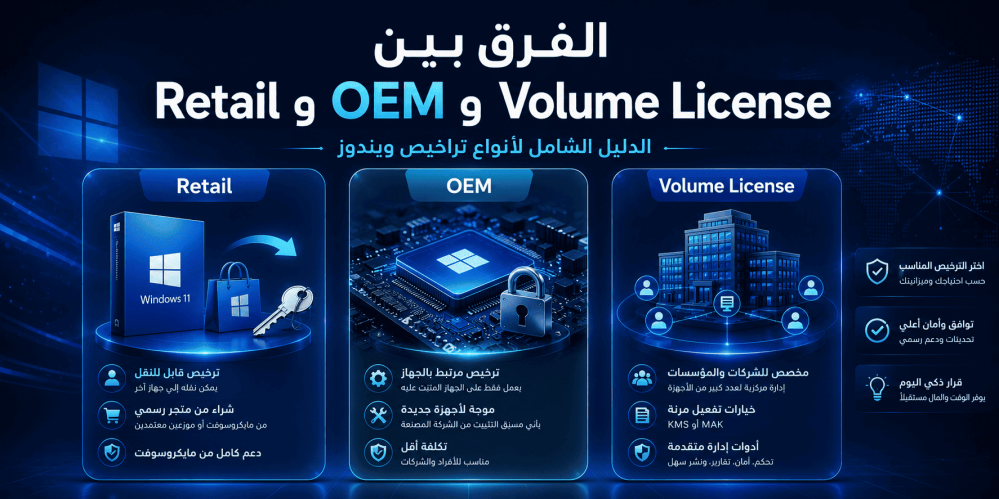
The Difference Between Retail, OEM, and Volume License: The Complete Guide to Windows License Types
When purchasing a Windows operating system, whether Windows 10 or Windows 11, you will inevitably encounter terms such as Retail, OEM, and Volume License. These terms are not merely different labels; they refer to entirely distinct license types in terms of price, installation method, transfer flexibility, technical support, and legal permissions. Choosing the right license is no less important than choosing the Windows edition itself, because the wrong license could cost you a great deal of money or restrict your use of the system in unexpected ways.
In this comprehensive guide, we will explain in detail each of the three main license types offered by Microsoft: Retail License, OEM License (Original Equipment Manufacturer), and Volume License. We will clarify the fundamental differences between them and provide practical advice to help you choose the most suitable license for your needs.
What Is a Retail License?
A Retail License is the license you purchase directly from the Microsoft online store or from authorized retail stores. This license usually comes in the form of a Product Key sent via email or printed on a card inside the product box.
Advantages of a Retail License
- Full Transferability: You can transfer a Retail license from one device to another without any restrictions, provided you deactivate it on the old device first. This flexibility makes it an ideal choice for people who upgrade their devices frequently.
- Direct Microsoft Technical Support: When you purchase a Retail license, you receive direct technical support from Microsoft for the entire validity period of the license.
- No Time Limit: A Retail license does not expire, and you can use it on a single device for as long as you need.
- Reinstallation Capability: You can reinstall Windows using the same product key on the same device an unlimited number of times.
Disadvantages of a Retail License
- High Price: Retail licenses are the most expensive compared to other license types. For example, the price of Windows 11 Pro Retail can exceed $200.
- Not Suitable for Large Organizations: If you manage an organization that needs to install Windows on hundreds of devices, purchasing Retail licenses for each device will be very costly and impractical.
What Is an OEM License (Original Equipment Manufacturer)?
An OEM License is the license that comes pre-installed on new devices when purchased from manufacturers such as Dell, HP, Lenovo, and others. OEM licenses can also be purchased separately at discounted prices compared to Retail licenses.
Advantages of an OEM License
- Low Price: OEM licenses are significantly cheaper than Retail licenses, making them an attractive option for budget-conscious users.
- Immediate Readiness: When purchasing a new device, Windows is pre-installed and ready to use as soon as the device is turned on.
- Fully Legal License: Despite the lower price, an OEM license is a legal and Microsoft-authorized license.
Disadvantages of an OEM License
- Tied to the Device: The biggest drawback of an OEM license is that it is tied to the motherboard of the device on which it was first installed. It cannot be transferred to another device.
- No Direct Microsoft Support: Technical support for OEM licenses is the responsibility of the device manufacturer, not Microsoft.
- Validity Tied to the Device: If the motherboard fails and you replace it, you may lose the license.
Important Note: OEM licenses sold separately (not pre-installed on a new device) are legally intended for System Builders who build and sell new computers. Using an OEM license on your old personal device falls into a legal gray area.
What Is a Volume License?
A Volume License is a licensing model designed specifically for organizations, companies, educational institutions, and government entities that need to install Windows on a large number of devices. This model enables centralized license management and significant cost savings.
Advantages of a Volume License
- Centralized Management: IT administrators can manage all licenses from a single centralized dashboard.
- Cost Savings: The more licenses purchased, the lower the price per license.
- Bulk Upgrade Capability: All devices can be easily upgraded to newer versions.
- Installation Flexibility: Supports the use of a Multiple Activation Key (MAK) or Key Management Service (KMS).
- Access to Enterprise Editions: Volume Licenses grant organizations access to advanced editions such as Windows 10 Enterprise and Windows 11 Enterprise, which include security and management features not available in Pro or Home editions.
Disadvantages of a Volume License
- Minimum Purchase Requirement: Most Volume License programs require a minimum number of licenses (usually 5 or more).
- Management Complexity: Requires an IT team to manage licenses properly.
- Not Available for Individuals: This type of license is not intended for individuals or home users.
Comprehensive Comparison Table of License Types
| Feature | Retail | OEM | Volume License | |
| Price | High | Low | Low (for businesses) | |
| Transferability | Full (can be transferred between devices) | Non-transferable (tied to the device) | Depends on the agreement type | |
| Technical Support | Direct from Microsoft | From the device manufacturer | Dedicated support for organizations | |
| Target Audience | Individuals and home users | Device manufacturers and regular users | Companies and organizations | |
| Reinstallation | Unlimited | Unlimited on the same device | Per the agreement | |
| Enterprise Editions | Not available | Not available | Available | |
| Centralized Management | Not available | Not available | Available | |
| Minimum Purchase | One license | One license | Usually 5 licenses or more | |
| Activation | Online or by phone | Embedded in BIOS/UEFI or online | MAK / KMS |
How to Choose the Right License for Your Needs
If You Are a Home User
The ideal choice for you is a Retail License if you:
- Plan to upgrade or change your device in the near future.
- Want direct technical support from Microsoft.
- Prefer full flexibility in using the license.
An OEM License suits you if you:
- Are buying a new device and plan to use it for a long time without changing it.
- Are looking for the lowest possible price.
- Do not need to transfer the license to another device.
If You Are a Business Owner or Organization
A Volume License is the only logical choice if you:
- Manage 5 or more devices.
- Need the advanced security features found in Enterprise editions.
- Want centralized management of all licenses.
- Are looking for long-term cost savings.
Windows 10 Enterprise: The True Power of Volume Licensing
When discussing Volume Licensing, one cannot overlook Windows 10 Enterprise, the most powerful edition of the Microsoft operating system, designed specifically to meet the needs of large organizations.
Key Features of Windows 10 Enterprise
- Microsoft Defender Advanced Threat Protection: Advanced protection against cyber threats.
- AppLocker: Full control over which applications are allowed to run on organizational devices.
- DirectAccess: Secure connection to the organization's network without the need for a traditional VPN.
- BranchCache: Improved network performance at remote branches.
- Credential Guard: Protection of credentials against identity theft attacks.
- Device Guard: Prevention of untrusted software from running.
- Microsoft Application Virtualization (App-V): Run applications virtually without installing them locally.
- User Experience Virtualization (UE-V): Synchronize user settings across different devices.
These features make Windows 10 Enterprise the ideal choice for organizations that prioritize security and centralized management.
Frequently Asked Questions About Windows License Types
1. Can an OEM license be upgraded to Retail?
No, an OEM license cannot be converted to a Retail license. If you want the features of a Retail license, you must purchase a new Retail license.
2. What happens to an OEM license if I change the motherboard?
Theoretically, an OEM license is tied to the motherboard. If you replace it, you may lose the license. In some cases, Microsoft may allow reactivation through customer service if the failure was beyond your control, but this is not guaranteed.
3. Are Volume Licenses legal for personal use?
Volume Licenses are designed for organizations and companies, not for individuals. Personal use may violate the license terms.
4. How many devices can I install a Retail license on?
A standard Retail license allows installation on only one device at a time. If you want to install it on another device, you must deactivate it on the first device.
5. What is the difference between MAK and KMS in Volume Licensing?
MAK (Multiple Activation Key) is an activation key used once per device and connects to Microsoft servers for activation. KMS (Key Management Service) is a local server within the organization that automatically manages activation for devices connected to the network.
6. Can I buy an OEM license and install it on my old device?
Technically, yes, you can. However, legally, standalone OEM licenses are intended for System Builders who sell new devices. Using one on an old device may violate the license terms.
7. Do I need a Volume License to use Windows 10 Enterprise?
Yes, Windows 10 Enterprise is only available through Volume License programs. It cannot be purchased as a Retail or OEM license.
8. What is the validity period of a Retail license?
A Retail license has no set expiration date. Once purchased, you can use it indefinitely on a single device (with the ability to transfer it between devices).
9. Can I purchase a single Volume License?
In most Volume License programs, the minimum purchase is 5 licenses. However, some programs such as Microsoft 365 for Business allow purchasing a single license.
10. How do I know what type of license is installed on my device?
You can determine the license type by opening Command Prompt as an administrator and typing the command: slmgr /dli, then pressing Enter. A window will appear showing the license type (Retail, OEM, or Volume).
11. Are OEM licenses less secure than Retail licenses?
No, in terms of security and functionality, there is no difference between OEM and Retail licenses. The difference is limited to usage terms, transferability, and technical support.
12. Can I use a Windows 10 license on Windows 11?
If you have a genuine Windows 10 license, you can upgrade to Windows 11 for free as long as your device meets the system requirements. The license will remain valid after the upgrade.
Important Tips Before Purchasing Any License
- Verify the License Source: Only purchase licenses from trusted and authorized stores. Licenses that are too cheap may be illegal or stolen.
- Read the License Terms: Each license type has specific usage terms. Make sure you understand these terms before purchasing.
- Plan for the Future: If you plan to change your device soon, a Retail license is the best option.
- For Organizations: Consult an IT expert before choosing the appropriate Volume License program.
- Check Device Compatibility: Especially when upgrading to Windows 11, make sure your device meets the minimum requirements.
Summary
Choosing the right license type for Windows depends primarily on your needs and usage circumstances:
- Retail License: The ideal choice for individuals who want full flexibility and direct support.
- OEM License: The economical choice for those buying a new device and not planning to change it.
- Volume License: The only logical choice for organizations and companies managing a large number of devices and requiring advanced features.
Always remember that a genuine license is an investment in your device's security and your system's stability. Non-genuine licenses may expose you to security risks, unreliable updates, and legal problems.
Recommended Products
If you are looking for a genuine and reliable license, we recommend the following products:
- Windows 10 Enterprise: The ideal choice for organizations and companies that need the highest levels of security and centralized management. This edition gives you all the advanced Enterprise features with a legal and genuine license.
- Windows 10 Pro Retail: If you are an individual user or small business owner looking for a Retail-style license with professional features, Windows 10 Pro is the perfect choice that combines a reasonable price with full flexibility.
- Windows 11 Pro Retail: For users who prefer the latest version of Windows with professional Pro features and full Retail license flexibility.